


HairApp: AI Hairstyle Try On
4.2216.00 Reviews
App Specs
- Version
- 1.0.73
- Updated On
- License
- Free
- Downloads
- 1,000,000+
- Developer
- xLabs Dijital Hizmetler Anonim Şirketi
- Categories
- Photography
- Platform
- Android
Screenshots
 Analysis by AppCompare
Trying a dramatic haircut in real life is a commitment; previewing one on a photo is not. That difference is why I find HairApp useful: it turns a vague “would that suit me?” into something I can look at and discuss before booking a salon appointment. Its appeal is strongest as a visual starting point, not as a promise that a digital result will match a stylist’s work exactly.
A preview is useful when the decision is still open
I’d reach for HairApp: AI Hairstyle Try On when I’m considering a change but can’t picture it from a reference photo. Trying several cuts or colors on my own image makes the choice more personal than scrolling through pictures of people with different features, lighting, and hair. It can also help me rule out an idea quickly, which is valuable when I’m stuck between keeping my current look and asking for something noticeably different.
The key is to treat the result as a conversation aid. A virtual look can suggest the overall direction—shorter, longer, warmer, cooler, straighter, or more textured—without answering practical questions about upkeep, styling time, or how a cut behaves with my actual hair. I would take a favorite preview to a stylist as a reference, then ask what would need to change to make it work in real life.
Start with a photo that makes comparison fair
For a more useful try-on, I’d use a clear, front-facing selfie with my hair visible and avoid a strong angle or dramatic lighting. This is not about producing a perfect portrait; it is about giving the app a consistent image to work with. If one version uses a bright, close-up photo and another uses a dim picture taken from the side, it becomes harder to tell whether I prefer the hairstyle or simply the photo.
I’d also keep the same image while comparing options. That small habit makes side-by-side decisions less subjective: I can focus on the outline, color, and balance around my face rather than differences in the source pictures. If the first result looks odd, I’d try another suitable selfie before deciding the style itself is a bad fit. An imperfect preview can reflect the image as much as the haircut.
Where it fits among photography tools
HairApp sits in a more specific corner of photography apps than a general editor. A standard photo editor is better when I want precise control over lighting, retouching, or an image’s overall finish. Browsing haircut photos is better for seeing how a style looks from multiple angles and on different hair types. This app’s advantage is convenience: it puts a hairstyle experiment on my own face, making it easier to imagine a change without building an edit from scratch.
That convenience has a trade-off. A generated preview is not a salon consultation, a technical cut plan, or a guarantee about how a shade will look under different lighting. I would not use one image alone to make a high-stakes color decision, particularly if I’m planning a major change. Instead, I’d use it to narrow down what I like, then ask a professional whether the look suits my hair’s texture, length, and condition.
Worth Reading Before You Choose

EA SPORTS FC Mobile 26 Is a Bigger Football Game, but It Takes Time

Flipboard Shows What News Apps Must Do Beyond the Feed

Switching to Android Auto Means Rethinking Your Driving Routine

Google Calendar Makes a Crowded Week Easier to Manage

Ludo King Makes the Most of the Minutes Between Plans

Baby Panda World Brings Quick Play to Modern Phones, but Its Game Library Feels Busy
It is also a lighter choice than a full photo-editing workflow. Someone who enjoys adjusting every detail manually may prefer a general editor, while someone who only wants to test a few hair directions may appreciate a focused tool. For me, the deciding question is whether I need inspiration on my own face or detailed control over the whole photograph.
For an ordinary weekend decision, I can imagine opening the app before sending a stylist a message: I’m thinking about a shorter cut, but I’m unsure how short. I could compare a few previews, save the one that feels closest, and use it to explain what I mean. That is a more practical use than asking the image to settle every detail; it gives the appointment a clearer starting point without pretending the final result is already decided.
Who will get the most from it
I think it suits people who are curious about a new look but want a low-pressure way to explore first. It can be especially handy when someone has a salon visit coming up, is considering a color they have never tried, or has trouble translating a celebrity or reference image into an idea that feels personal. Saving a few favorites can help keep those possibilities together instead of relying on memory during a consultation.
I’d be less likely to recommend it to someone who expects an exact preview of a finished haircut, needs a professional assessment, or already knows precisely what they want and simply needs to communicate it to a stylist. It is also not a substitute for trying a look in person when important details depend on movement, maintenance, or the way a person’s own hair naturally falls. The best use is exploration, not certainty.
HairApp is a free photography app from xLabs Dijital Hizmetler Anonim Şirketi, with optional in-app purchases priced from $7.99 to $39.99 per item. It is rated for Everyone, so its basic audience is broad, though I’d still check the purchase prompts carefully if I’m only interested in casual experimentation. The app has a 3.8 average from around 10,000 ratings, and its 100,000-plus installs suggest that people are using it to explore hair looks, but neither figure tells me whether a particular preview will suit my photo or expectations.
It was released on February 14, 2025, and version 1.0.56 is listed for devices running Android 7.0 or later. Those details make it easier to judge whether it may fit an Android setup; the main thing I’d consider before spending time with it is whether I want a quick visual experiment or a more exact, hands-on editing process.
A few sensible ways to use the results
One useful approach is to compare the direction of a change rather than chase a supposedly perfect image. For example, I might decide that a bob looks more appealing than long hair even if neither preview is polished enough to show a stylist as a literal blueprint. I can then search for real examples of that cut and ask how it would be adapted to my hair. This separates “I like the idea” from “I know exactly what to request.”
Color comparisons benefit from the same restraint. I’d use the app to explore broad preferences—perhaps warmer versus cooler tones—then remember that a digital shade can look different against real hair and in different light. If I’m unsure, I’d save more than one option and ask a stylist which direction is realistic. That avoids treating a screen preview as a reliable promise about the outcome.
I’d also avoid judging a style from a single glance. A dramatic change can feel surprising simply because I’m used to my current appearance. Looking at a few options, stepping away, and returning later can help distinguish a genuine preference from the novelty of seeing something new. The app is most helpful when it supports that decision process rather than trying to rush it.
What I would keep in mind before committing
Trying looks can be fun, but I would set a boundary before exploring paid options. Since the app is free to download and includes in-app purchases, I’d check what is available without payment before getting attached to a particular workflow. That is a practical step for anyone who only wants a quick preview and does not want an unexpected purchase to become part of the experience.
I’d also think about the photograph I choose to use. A selfie is personal, so I would select an image I’m comfortable working with and avoid treating a saved or shared preview as a definitive record of what I should look like. The most useful result is one that helps me communicate an idea to myself or a stylist; sharing is optional, not necessary for the app to serve that purpose.
For readers wondering whether they need a perfect selfie, I wouldn’t make that the barrier to trying it. A clear image with the face visible is a sensible place to start, and if the result seems unconvincing, I’d test a different photo before drawing a conclusion. If the question is whether the app can replace a stylist’s judgment, my answer is no: it can help me arrive with a better-defined preference, but the professional conversation still matters.
Getting Started with HairApp
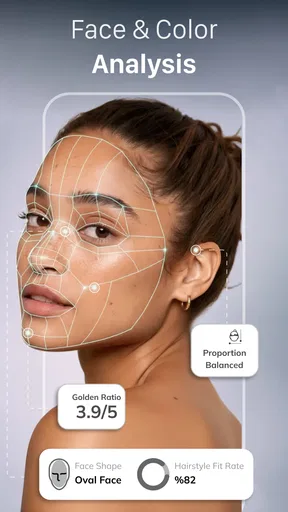
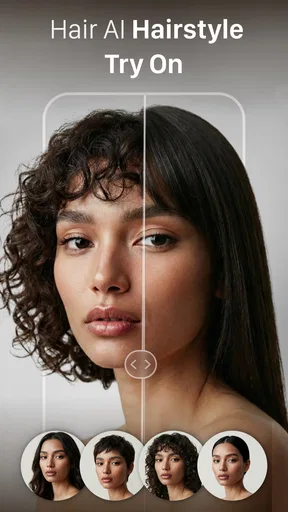
So, you download HairApp: AI Hairstyle Try On, and right off the bat, it’s super easy to navigate. The interface is clean and intuitive, so you won’t find yourself lost in a maze of features. Once you’re in, you can either upload a selfie or snap a new pic. The app’s AI quickly analyzes your face shape, and voilà, you’re ready to explore a whole new world of hairstyles.
Features to Play With
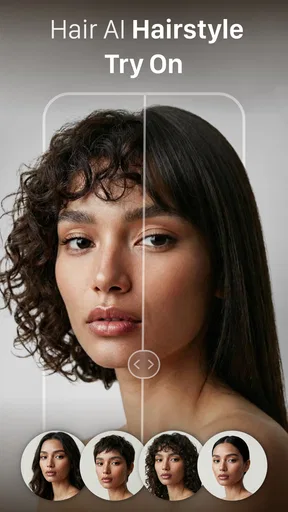
The variety of hairstyles available is pretty impressive. From chic bobs to long, flowing locks, and even funky colors that you’d never dare try in real life, HairApp has it all. The AI technology is spot-on, seamlessly integrating the hairstyles with your photo. It’s like having a virtual wig collection at your fingertips.
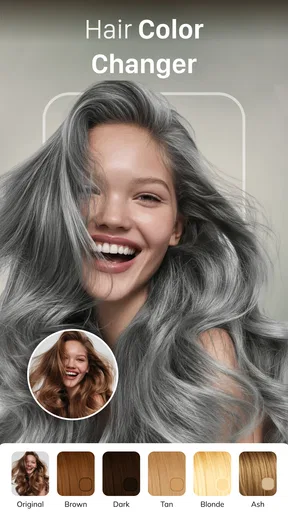
Another cool feature is the color change option. Wanna see how you’d look as a fiery redhead or with icy platinum blonde hair? Just a few taps, and you’re there. It’s not just about the cuts and colors; the app lets you try on different textures as well. Whether you’re curious about curly, wavy, or straight styles, HairApp has got you covered.
Real-Time Experimentation
One of the things I loved most about HairApp is the real-time feature. You get to see yourself moving with the new hairstyle, which gives a much better idea of how it’ll look in everyday life. It’s not just a static image; it feels real. Plus, you can adjust the size and orientation of the hairstyle to fit perfectly with your head shape.
The Social Element
What’s the point of finding a killer new hairstyle if you can’t show it off, right? HairApp makes it super easy to share your new looks on social media. Whether you want feedback from friends or just want to flaunt your potential new ‘do, sharing is just a click away. The app also lets you save your favorite styles for future reference, which is a handy feature when you finally decide to take the plunge at the salon.
Personal Experience
As someone who’s always been hesitant about changing my hair, this app was a game-changer. It gave me the confidence to try something new without the fear of commitment. I spent hours experimenting with styles I’d never considered before, and it was genuinely fun. HairApp doesn’t just help you find a new hairstyle; it helps you discover a new side of yourself.
There’s something incredibly freeing about being able to visualize a drastic change with no strings attached. It’s like playing dress-up but with your hair, and who doesn’t love a bit of harmless fun?
Final Thoughts
If you’re on the fence about a hair makeover or just love experimenting with different looks, I can’t recommend HairApp enough. It’s not just an app; it’s an experience. Whether you’re planning a salon visit or just want to see how adventurous you can get, HairApp is a must-try. Give it a go, and who knows? You might just find your next signature style.
Pros
- Wide variety of hairstyles to try on.
- Realistic AI-generated hairstyle previews.
- Easy-to-use interface for all ages.
- Regular updates with new styles.
- No account needed for basic features.
Cons
- Limited free options
- many are paid.
- Occasional lag with older devices.
- In-app ads can be intrusive.
- Requires internet for full functionality.
- Some styles may not suit all hair types.
FAQs for HairApp: AI Hairstyle Try On
What features does HairApp: AI Hairstyle Try On offer?
HairApp uses advanced AI technology to allow users to virtually try on a variety of hairstyles and colors. It includes a wide range of styles, from casual to formal, and supports the latest trends. The app also offers customization options to adjust the hairstyle to better fit your face shape and personal preferences.
Is HairApp suitable for all hair types and textures?
Yes, HairApp is designed to cater to diverse hair types and textures. Whether you have curly, straight, wavy, or coily hair, the app provides options that are tailored to different hair characteristics, ensuring a realistic preview experience for all users.
How accurate are the hairstyle simulations in HairApp?
The app leverages cutting-edge AI algorithms to deliver highly accurate simulations. While results can vary based on individual features, most users find the virtual try-ons to be a close representation of how styles would look in reality. Lighting conditions and photo quality can also affect accuracy.
Is there a cost associated with using HairApp?
HairApp offers both free and premium versions. The free version provides access to a limited number of styles, while a subscription unlocks the full potential of the app, including exclusive styles, advanced customization options, and ad-free usage. Pricing details are available within the app.
Does HairApp require an internet connection to function?
An internet connection is required for initial downloads and updates, as well as for accessing some features, such as the latest hairstyle trends. However, once styles are downloaded, you can use many features offline, making it convenient for on-the-go experimentation.


